Platform

Everything NXSgate does, in one place

Zone rules, NXSGuard protection, App Control, Inspect and SD-WAN with NXS Braid, plus NXS Explain to tell you what each of them did. For bigger networks, split one box into virtual firewalls and map a data center with NXS Grid. One product, one console. Here's how each part works.

Security zones

Set up your zones once. Enforce them everywhere.

Every NXSgate policy starts with zones. Group interfaces, VLANs and VPN tunnels into zones that match how your network is actually used, then write one rule list that decides what may cross between them. Zone rules are the only firewall rules, as on enterprise firewalls.

  • Every interface is in a zone. Physical ports, VLANs, IPsec and NXS Braid tunnels. A new interface joins a zone by itself, and tunnels go to the VPN zone.
  • Blocked until you allow it. Traffic between zones is denied until a rule lets it through, and the default deny logs what it stopped.
  • Data center tiers. Put servers into Web, App and Database tiers with a Management zone. Only the services you list pass between tiers, and a preview shows the result before it applies.
  • Changes you can take back. A zone change runs on a timer. Keep it, or NXSgate undoes it by itself after two minutes, so a mistake can't lock you out.
NXS Explain

Ask the firewall why, and get an answer you can check.

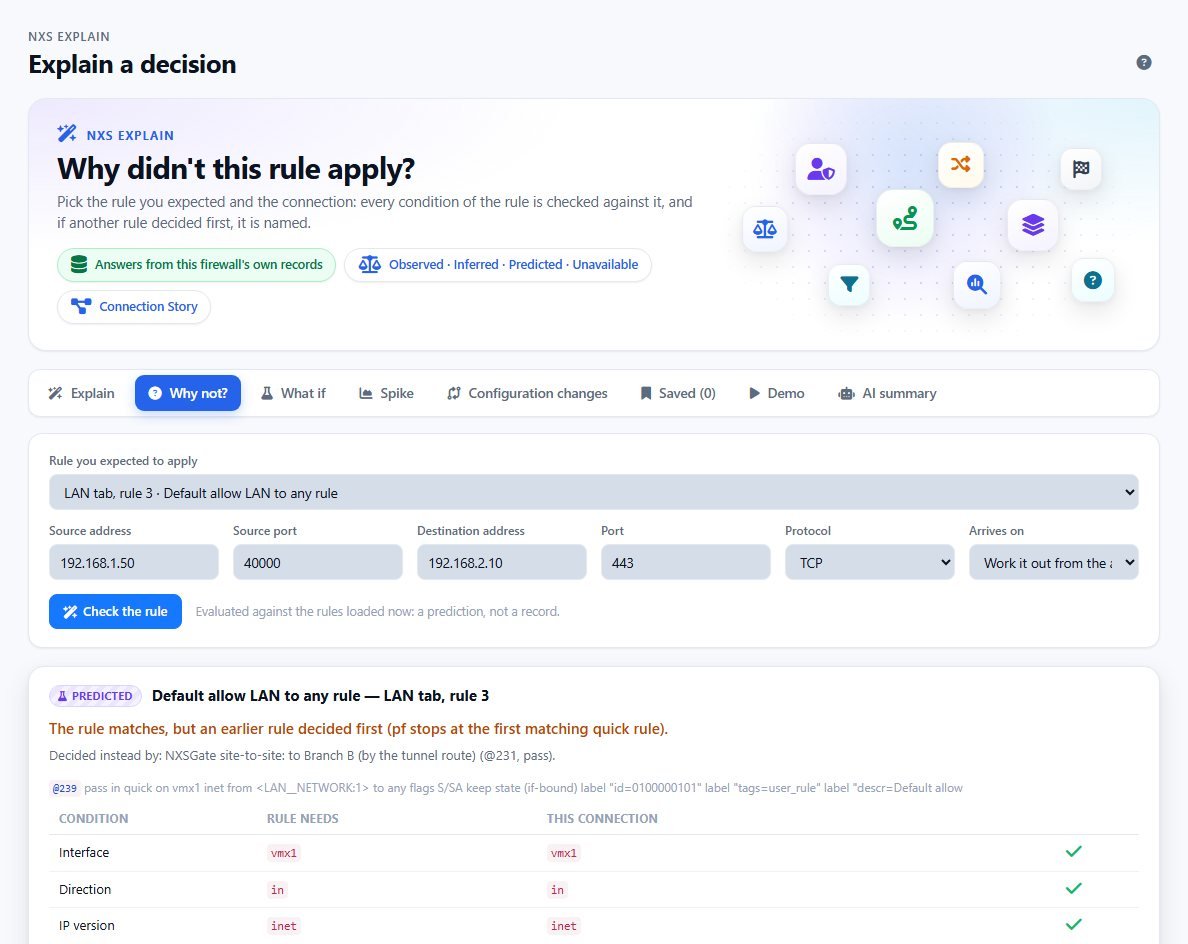
NXS Explain takes any connection, log line, IPS alert or Inspect event and explains it layer by layer: what the firewall, the IPS, DNS filtering, App Control and Inspect each did, which rule applied, and the records that prove it. What the records can't show, it says plainly.
  • Explain any decision. One click from sessions, the firewall log, NXSGuard events, IPS alerts and Inspect events.
  • "Why didn't my rule apply?" Every condition of the rule you expected is checked against the connection, and the rule that decided first is named.
  • What if, spikes and changes. See what the current rules would do, explain a traffic spike from measured data, and compare configuration versions.
  • AI stays optional. AI summaries are off by default, see only redacted data, and never decide or change anything.
NXS Explain answering why a rule didn't apply: the rule the administrator expected matches the connection, but an earlier rule decided first, and each condition is checked in a table.
Threat prevention · NXSGuard

Stop known threats before they get in.

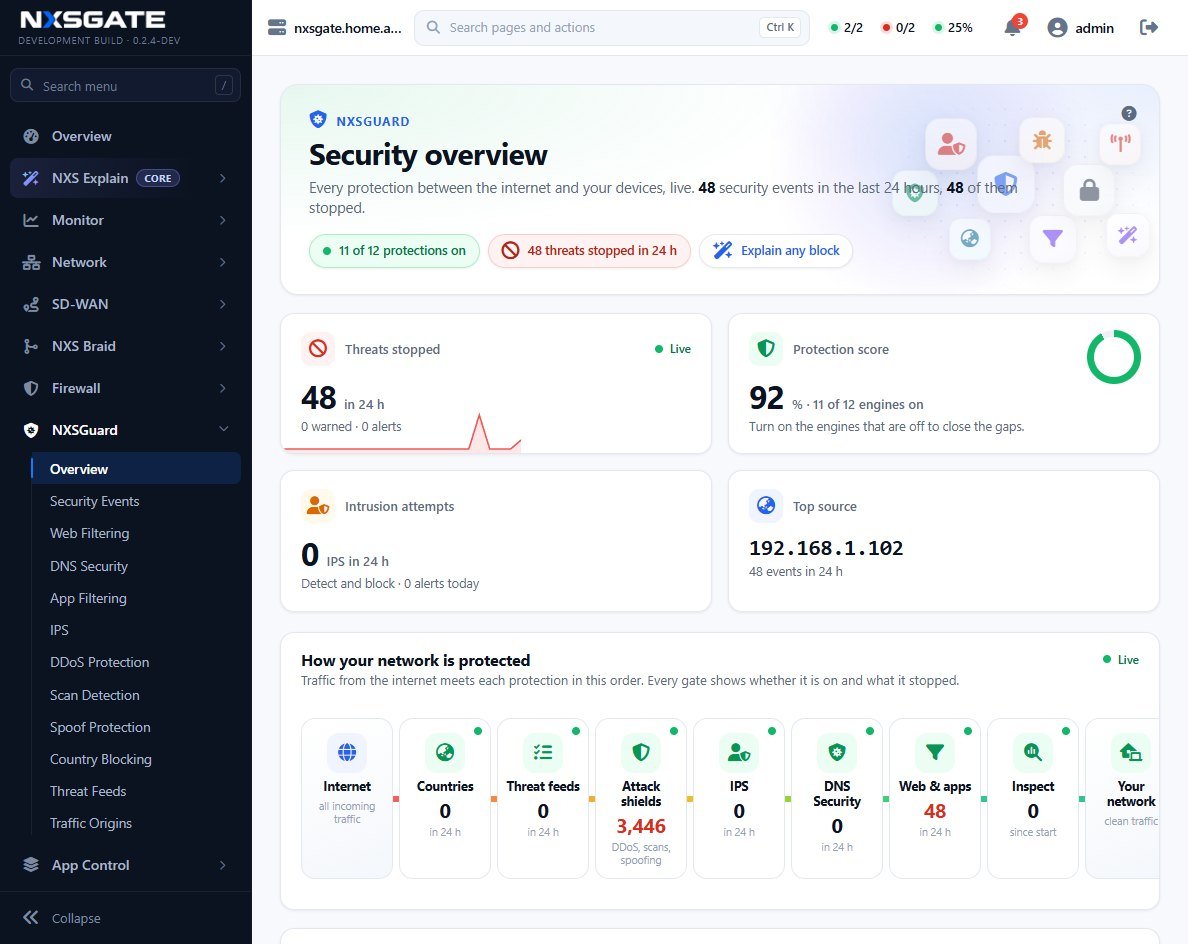
NXSGuard puts every protection between the internet and your devices on one page. The protection pipeline shows, live, which stage stopped what, and every block can be explained.
  • Intrusion prevention. Blocks exploits, brute-force attempts and protocol abuse, with ready-made presets such as one for servers.
  • Country blocking and threat feeds. Drop traffic from countries you don't work with and from known-bad addresses, kept up to date by NXSgate's feed service.
  • Attack shields. DDoS, port-scan and spoof protection on every internet link.
  • DNS and web filtering. Allow, warn or block by category with a branded block page. Malware and phishing domains are stopped at the lookup.
NXSGuard security overview: threats stopped in 24 hours, intrusion attempts, a protection score, and the protection pipeline from countries and threat feeds through attack shields, IPS, DNS security, web and apps to Inspect.
Application control

Know which apps are running, and decide what they can do.

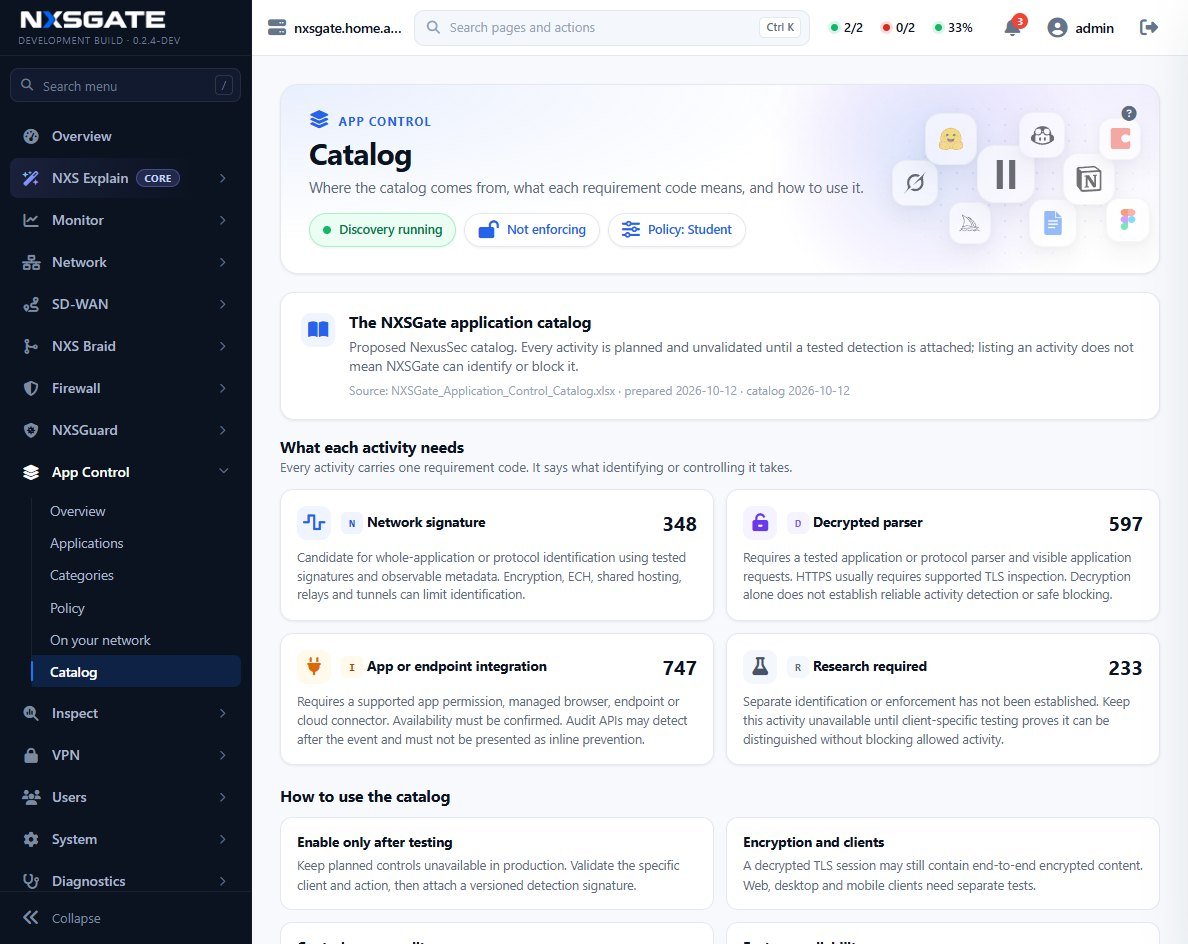
NXSgate identifies the apps in use across your network from a catalog of 326 applications and 1,925 activities in 21 categories. It's honest about each one: you always see what identifying an activity takes, and what can be controlled today.
  • Rules down to the activity. Block YouTube video without blocking YouTube, or switch off one feature inside an app.
  • Nothing promised that isn't tested. An activity only counts as controllable once a tested detection is attached to it.
  • Find shadow IT. See which apps and AI tools are in use on your network, and on which devices.
  • Connection Story. A flow map from your devices to the apps and servers they reach, drawn from recorded traffic.
The App Control catalog: activities grouped by what identifying them needs, from network signatures and decrypted parsers to app or endpoint integration, with counts for each.
Inspect

Look inside encrypted traffic, only where you should.

Most web traffic is encrypted. Inspect decrypts it only for devices you manage, which trust your firewall's certificate. Everything else passes through untouched.

  • Managed devices only. Guests, personal phones and anything you don't manage are never decrypted.
  • See what matters. AI prompts, searches and uploads on managed devices, with policy you set.
  • Download sandbox. Downloaded files are identified by type, and risky ones are held and scanned before they're delivered.
  • Explained like everything else. Every Inspect event links straight to NXS Explain.
Secure connectivity

Connect every office, every link and every route.

Run your WAN, site-to-site links and routing on the same gateway that enforces your zones. The zone rules decide whether traffic may pass; SD-WAN decides which link it takes.

  • SD-WAN and NXS Braid. Load balance by share, fail over in order, or bond every link into one connection. When a link fails, devices are told at once.
  • Site-to-site VPN. IPsec and NXS Braid tunnels between your sites, with every path measured live.
  • High availability. Pair two firewalls with shared addresses, state sync and a failover test that undoes itself. In our lab, a live connection survived failover and failback.
  • Routing and load balancing built in. BGP, OSPF and BFD, and services published over server groups with health checks. No add-ons to install.
NXS Braid IPsec IPsec VPN HeadquartersHA pair Branch office2 links, bonded Data centerBGP · OSPF Retail siteFailover Remote usersVPN client
Virtual firewalls · vNex

One NXSgate, many firewalls.

Split one box into separate firewalls for tenants, branches or a lab: an eight-port box can be two firewalls of four ports, or four of two. Each vNex runs NXSgate itself in its own network stack, so it isn't a folder of rules. It's a firewall.

  • Everything of its own. Ports or VLANs, zones and zone rules, NAT and port forwards, routes, a DHCP server and a DNS resolver, with its own packet filter and connection table.
  • Its own console. Open a vNex from the Global view, or switch to it in the top bar. Inside, only its own ports show, and settings for the whole box stay out of reach.
  • Links you control. A vNex link is a virtual cable between two vNexes. Each end is a port in a zone of its vNex, and that vNex's zone rules decide what crosses.
  • The box stays in charge. The root firewall keeps updates, administrators and the console for the whole box. vNexes start with the system.

In lab testing In our lab, a client behind a vNex got its address and DNS from that vNex and reached the internet through the vNex's own NAT. Next: vNex administrators who see only their own vNex, resource limits, and VPN, SD-WAN and IPS per vNex.
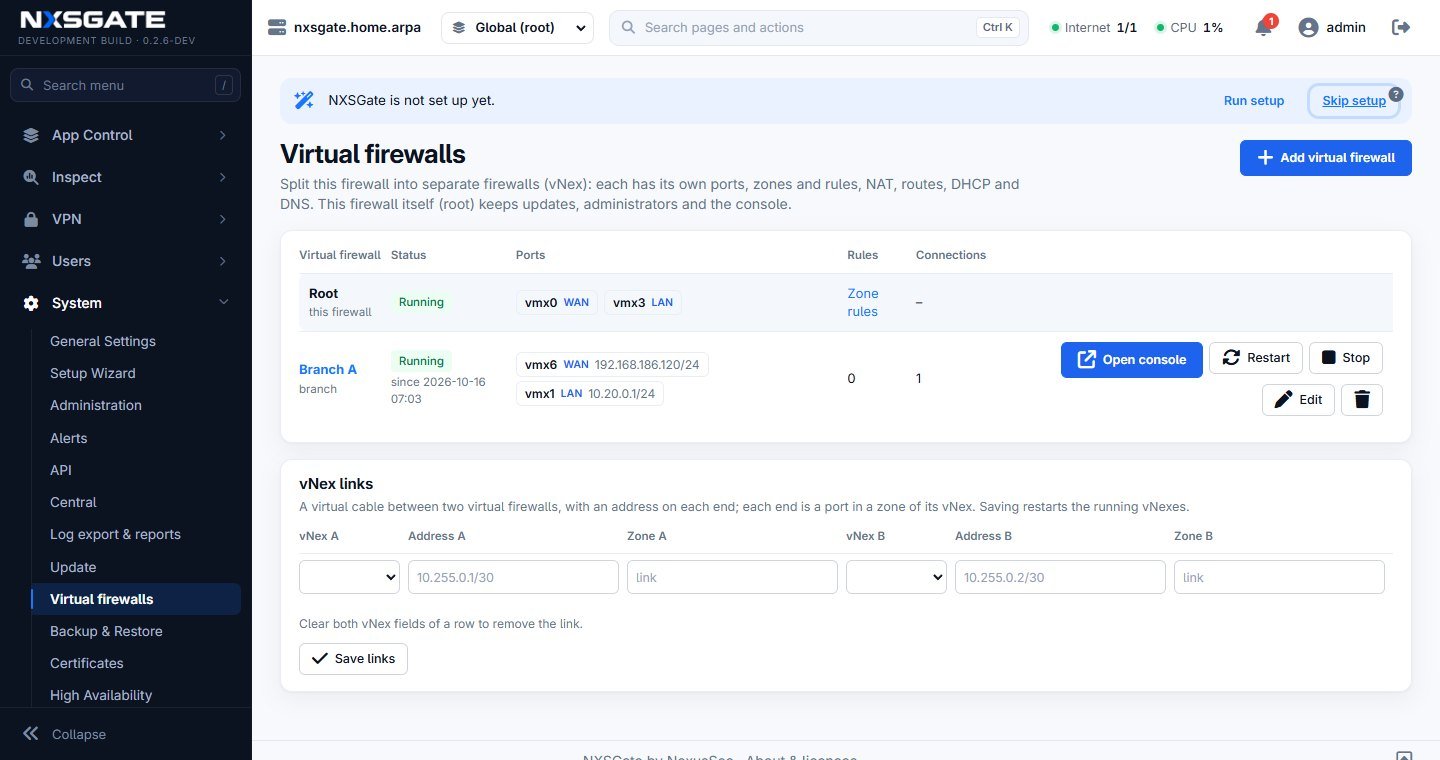
System, Virtual firewalls, in the Global view: the root firewall with its WAN and LAN ports, and a vNex called Branch A, running, with its own WAN and LAN ports and addresses, an Open console button, restart, stop, edit and delete, and a table for vNex links between virtual firewalls.
Data center · NXS Grid

See the infrastructure. Understand the traffic.

NXS Grid maps a data center from what the firewall itself knows: its ports and routes, the devices it discovers and the connections passing through it right now. It appears when NXSgate is set up as a data-center firewall, and it never shows sample data. A panel with nothing to show says why.

  • A topology you can work with. Zoom, pan and search, with physical, logical and virtual views and traffic, health and security overlays. Every line says how it's known: an observed link, observed traffic, configuration, or only inferred.
  • Traffic and assets. Live flows with the zone rule that allowed each one, a click away from NXS Explain, and an asset list built from ARP and DHCP that you can add to and export.
  • Segmentation you can check. A zone-to-zone matrix of observed and blocked traffic, with findings such as overly broad rules, rules nothing uses, exposed management and IPS alerts tied to the devices involved.
  • Change with care. Take a snapshot before a change and compare it afterwards. NXS Grid never edits rules itself: a finding opens a draft rule for you to review.

In lab testing Next: switch and port details over LLDP and SNMP, and traffic history.
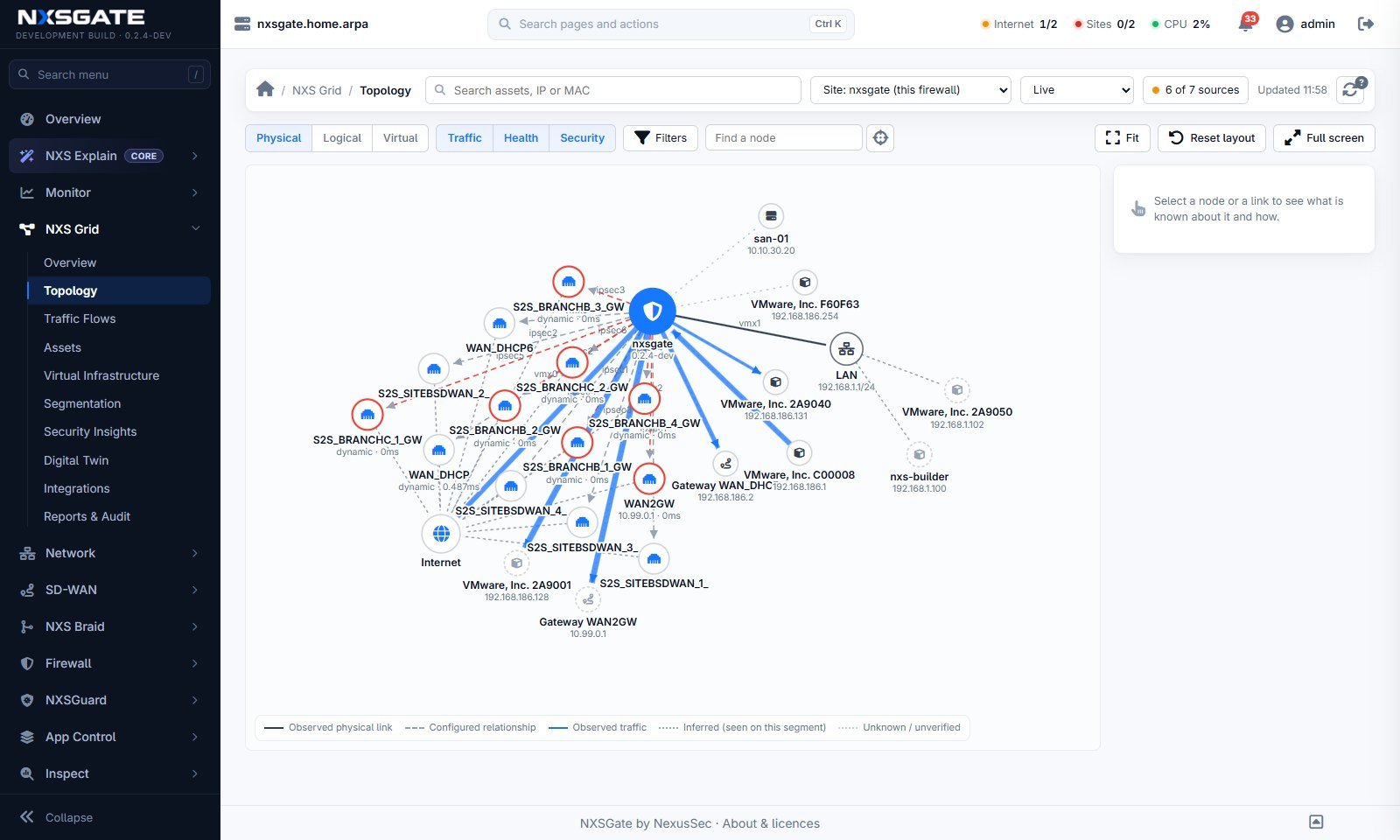
NXS Grid topology: the firewall at the centre with its LAN, gateways, site-to-site tunnels and discovered devices. Line styles show observed physical links, configured relationships, observed traffic and inferred connections, with buttons for physical, logical and virtual views and traffic, health and security overlays.
Management & automation

Manage one firewall or many.

A console that answers your first question before you ask it, the APIs your platform team expects, and logs that go where your security team works.

  • An Overview that answers first. Eight status cells, then traffic, security posture, interfaces, site-to-site, alerts and the busiest rules from the firewall's own counters.
  • Policy as code. Zones, zone rules and server groups as one JSON document. Plan, apply and keep it through the REST API.
  • Logs, alerts and SIEM. Log search and retention on the firewall, SIEM export as JSON (ECS) or CEF over UDP, TCP or TLS, and daily or weekly email reports.
  • Safe sign-in and updates. Two-factor sign-in for administrators, API tokens with an audit log, and updates that roll back on their own if health checks fail.
  • Many firewalls. NXSgate Central shows the health of your whole fleet. A firewall joins with a one-time code and checks Central's certificate, then connects out over mutual TLS, so nothing reaches back in.
Models & specifications

NXSgate appliances are in development.

We're qualifying the first appliance hardware now. Every model will run the same software and console as the rest of NXSgate. Until they ship, run NXSgate on x86-64 hardware you choose or in a virtual machine.
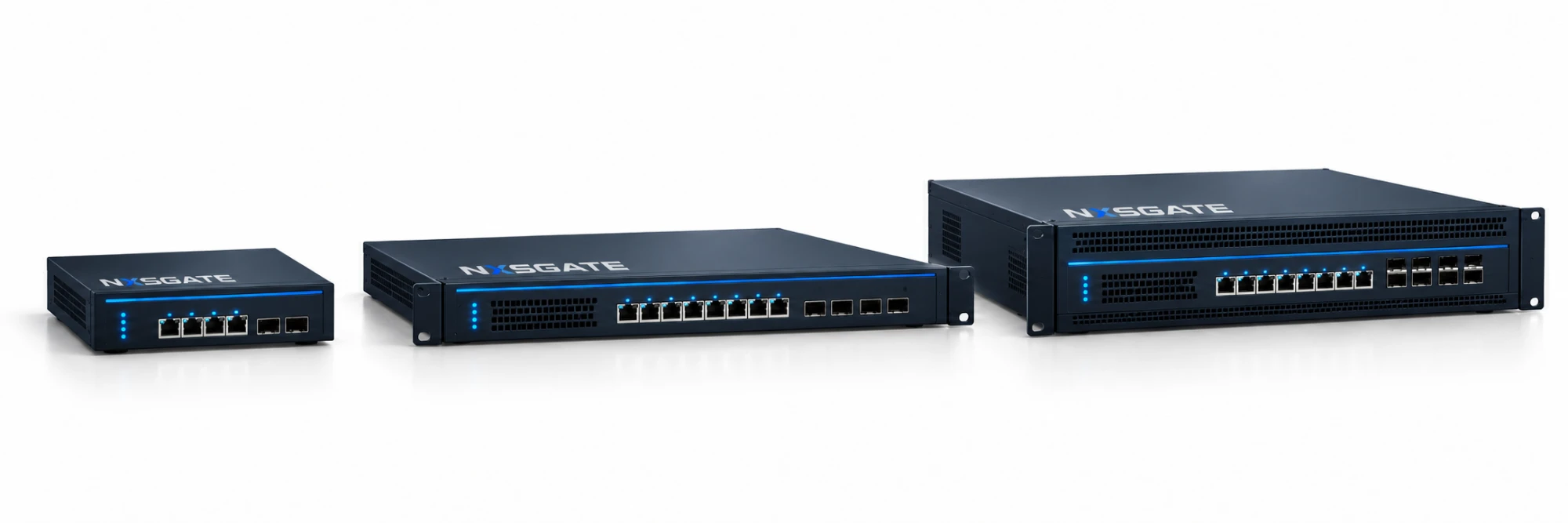
Three NXSgate appliances side by side: a compact desktop model, a 1U rack-mount model and a 2U rack-mount model.
Concept design. Final hardware may differ.

Swipe sideways to see every model.

Specification NXS-100Branch & small office NXS-500Mid-size & campus NXS-2000Large enterprise NXS-5000Data center NXS-VVirtual machine
StatusIn developmentIn developmentIn developmentIn developmentIn lab testing
Planned form factorDesktop1U rackmount1U rackmount2U rackmountVM image
High availabilityActive/passive pair with state sync, already in the software
Throughput & sessionsPublished once measured on the final hardware
InterfacesConfirmed with the final hardware

Model names, form factors and designs are plans and may change. Ask us and we'll tell you when the first datasheets are out.

Integrations

Works with the tools you already use.

Send logs, alerts and policy to the systems your teams rely on.

Sign-in

LDAPRADIUSTwo-factor (TOTP)API tokens

Logs & SIEM

SyslogJSON (ECS)CEFUDP, TCP or TLS

Automation

REST APIOpenAPIPolicy as codeSigned webhooks

Alerts

EmailSlackMicrosoft TeamsDiscord

Put NXSgate in front of your own traffic.

We're letting a small group of organizations try NXSgate before launch. Run it on your own network and see exactly which apps, users and threats are crossing it.